



You have written an engrossing book, got a stunning cover designed, and written a captivating blurb. You’re all set to publish your eBook through Kindle Direct Publishing (KDP). Before you hit that publish button, here’s something to think about.
Dear poet/writer, we’d love to know you better.
What are you writing?
In prose, you prefer…
To stay informed about articles related to poetry writing,
would you like to get emails from us?
We don’t spam and you can unsubscribe any time.
In prose, you prefer…
To stay informed about articles related to fiction writing,
would you like to get emails from us?
And we’re happy to throw in two free courses, too
We don’t spam and you can unsubscribe any time.
To stay informed about articles related to prose and poetry writing,
would you like to get emails from us?
And we’re happy to throw in two free courses, too
We don’t spam and you can unsubscribe any time.
To stay informed about articles related to non-fiction writing,
would you like to get emails from us?
And we’re happy to throw in two free courses, too
We don’t spam and you can unsubscribe any time.
What should be the price of my eBook? How much money can I actually make through Kindle Direct Publishing? Do I want to publish my eBook only on Amazon?
Now, if you’re a dreamy writer like me, you might think, I don’t want to get into the complex financial aspects; I just want to see my book out in the world!
A few years ago, when I published my first Kindle eBook, I thought the same. But then, I came across stories of people making a lot of money from Amazon Kindle Direct Publishing. For example, Sundari Venkatraman, a famous KDP author, has written 50 books in six years and has made 40 lakhs through KDP (that too after tax!).
So, publishing eBooks on Kindle Direct Publishing could be a decent source of income, but first, you should know the nuances of the KDP royalty model and how to use it best to maximize the revenue from your eBooks.
In this article, I’ll share everything I’ve learned from publishing five books on Amazon and earning a decent income from my Kindle eBooks.






Kindle Direct Publishing: Payment Models
There are two ways you can make money through Kindle Direct Publishing.
- Standard eBook royalties
- Royalty from Kindle Edition Normalized Page (KENP) reads
Let’s explore both these options a bit further.
Standard eBook Royalties: 35% Vs. 70%
Kindle Direct Publishing has two royalty plans—one gives you 35% royalty and the other gives you 70% royalty on your eBook. You should choose a royalty plan during the ‘eBook Pricing’ stage of the Kindle eBook publishing.
Let’s say your book is priced at ₹120. If you choose the 70% royalty plan, you’ll get ₹69 after deductions. If you select the 35% plan, you’ll only get ₹36.

So, when you can get 70% royalty, why would anyone choose the meager 35% plan? You might wonder.
The answer is: like everything that seems lucrative in life, the 70% royalty also comes with strings attached. Here, that string is called KDP Select.
KDP Select Enrollment
You may opt for the 70% royalty plan only if you enroll your book in KDP Select. It’s a special program Amazon offers to Kindle authors. If you enroll your book in KDP Select, it will be available for Kindle Unlimited (KU) subscribers worldwide.
Kindle Unlimited subscribers can “borrow” your eBook instead of buying it. So, how do you make money when they read your book? You’ll get paid based on Kindle Edition Normalized Page (KENP) reads.
When you enroll your eBook in KDP Select, you’ll have two sources of revenue – eBook sales royalty and KENP royalty. Here’s a sample calculation of the total monthly income from a book enrolled in Kindle Select.
Example: How To Calculate Royalty For an eBook
Let’s say you have an eBook priced at ₹120 and enrolled the book in Kindle Select. You’ve chosen the 70% royalty plan (you can, since you’ve opted for Kindle Select.)
Let’s say you make 50 eBook sales in the first month, and Kindle Direct Publishing reports that 600 pages of your book have been read in one month.
So, your total royalty would be:
Earning from an eBook sale = (120 – (15% GST))* 0. 7 – Delivery Fee
= (₹102 * 0.7) – ₹3
= ₹71 – ₹3 = ₹69
Note: Delivery fee may vary based on the eBook’s file size. Here, we have assumed ₹3 as the delivery fee.
Earning from KENP reads = 600 * (KENP Rate)
Let’s assume the KENP rate is ₹0.09/page read.
Earning from KENP reads = 600 * ₹0.09 = ₹54
Your monthly eBook royalty is the sum of eBook sales and KENP reads.
Monthly book royalty = (earning from one eBook * number of eBooks sold) + earning from KENP reads/ month
= (69 *50) + ₹54 = ₹3450
The KENP read royalty seems very small compared to the eBook sales royalty. However, you’re getting a 70% royalty on sales because you’ve enrolled in Kindle Select.
Here are a few points to note:
- The delivery fee is applicable only for books under the 70% royalty plan and not for the 35% plan.
- Even if you enroll in Kindle Select, your ebook pricing should be above a certain number to claim the 70% royalty. For example, in India, you should price your book above ₹99 to claim the 70% royalty.
- The KENP rate is determined by Amazon every month. It’s calculated based on the following formula.
KENP Rate for a month = Total KDP fund for a marketplace / total KENP page reads in that marketplace. Amazon sends a mail every month, updating the authors with KENP rate.
Enrolling your book in KDP Select is a crucial decision that will influence the income from your eBooks. So, how do you decide to enroll your book in KDP Select? While there is no definite answer to this, looking at the pros and cons of KDP Select will help you make a decision.
Amazon or Self Publishing in India: 3 important options to consider when you are gearing up to publish your book.
Advantages of Enrolling Your Book in KDP Select
The biggest advantage of enrolling in KDP Select is the eligibility for the 70% royalty plan. However, it’s not the only advantage of KDP Select.
- Enrolling in KDP Select opens up your book to Kindle Unlimited readers. KU has millions of subscribers, and your book will reach a wider audience.
- KDP Select allows you to run various promotional campaigns like free Kindle eBook promotions and Kindle Countdown Deals (not available in India) to widen your reader base.
- Amazon KDP nominates KDP Select books for various Kindle Deals, giving your book visibility.
Disadvantages of Enrolling Your Book in KDP Select
If you enroll your eBook in KDP Select, Amazon gains the exclusive right to sell your eBook. It means you can’t sell your eBook on platforms like Apple Books, Kobo, Google Books, and Etsy. Neither can you upload your eBook on online writing platforms. So, you’re losing the chance of getting royalties from these alternate sources.
You might also lose out on some of the eBook sales. If your book isn’t available on Kindle Unlimited, some KU subscribers will buy the book. But that sales opportunity is lost when you enroll your book in Kindle Select.
Does that sound too restrictive? Here’s a bit of good news. The default Kindle Select enrollment period is ninety days. At the end of ninety days, you may take your book out of the program and publish it on any other eBook platforms.
A word of caution here: You should be careful to turn off the auto-renewal. If you check the auto-renewal box, your eBook will be enrolled for another ninety days once the current term ends.

Now that you know how the Kindle Direct Publishing eBook royalties work, let’s look at another crucial factor: the pricing of your Kindle eBook.
How To Determine the Price of Your Kindle eBook?
Let me start with a disclaimer. There are no hard and fast rules on how much a Kindle eBook costs.
Yes, KDP mandates that the Kindle eBook price should be within ₹49 and ₹10999 in India, and other countries have similar ranges. But that’s such a wide range, practically giving the author the flexibility to price the book at whatever amount they want.
So, how do you decide the price of your eBook? Here are a few tips.
- If you have a print edition of your book, you might want to price the ebook edition at a lower cost. For example, the famous self-help book Ikigai is priced at ₹265 for a hardcover and ₹189.05 for a Kindle ebook.
- Check out the prices of a few books that are similar in size and genre to your book. You might want to price your eBook somewhere around this range.
- You may also reverse engineer the pricing. Decide how much royalty you expect from an eBook and work out the pricing that’ll give you that amount after Amazon’s cut, taxes, and delivery fee.
Pricing your eBook could be a bit of trial-and-error until you’ve landed on a price that works best for you. For that, you must first know how your eBooks are selling and how many KENP reads you’re getting. The KDP’s new reporting dashboard will help you collect all the data you need.
Let’s have a peek at the KDP’s reporting dashboard and how you extract useful data from it.
How to Read KDP’s Reporting Dashboard
KDP’s reporting dashboard gives you helpful information about the total orders, KENP reads, and the previous month’s sales. It also has a royalty estimator tool that will give you an estimate of the upcoming month’s royalties.
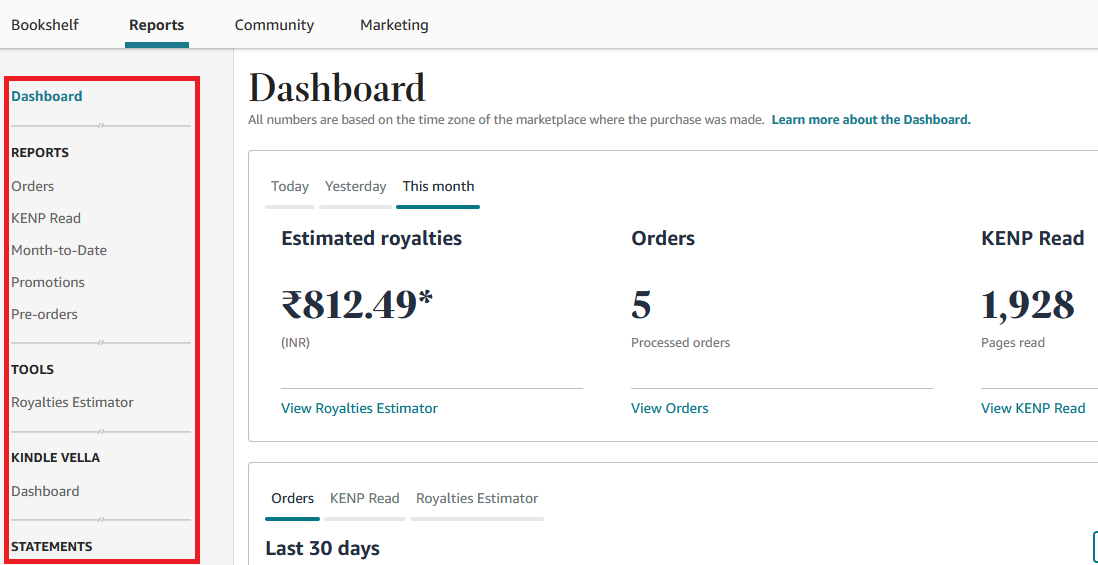
Here are a few useful things you can do through the reporting dashboard.
Orders Filtered by Time and Books
You can dive deep into the eBook orders through the ‘orders’ section of the KDP reporting dashboard. The orders page has many filters that will help you derive insights about how your eBook is selling.

Using the filters, you can figure out a lot of useful information:
- How many copies of a particular ebook are sold in a month, three months, a year, and lifetime?
- Which territories did your book sell in a particular time period?
- Compare the sales of all your books over time.

KENP Reads Filtered by Books and Time
Under the ‘KENP Reads’ tab of your KDP reporting dashboard, you’ll see the number of pages your books read by Kindle Unlimited readers.
You may derive insights related to your book’s performance in Kindle Select.
- How many pages of an eBook read in a month, three months, this year, or lifetime?
- KENP read filtered by marketplaces.
- Compare the KENP reads of your different eBooks.

Royalty Estimator Tool
We have seen eBook orders, and KENP reads reports. Now, let’s talk about the most exciting part of the KDP reporting dashboard — the one that shows your money!

The royalty estimator tool has many useful features:
- Shows the total royalty you made from all your books filtered by time — day, week, year, or lifetime.
- Filter the total money made by eBook sales, or KENP reads over different time periods.
- Compare the royalties made by different books over various periods.
- View your royalties in different currencies.
- Predict a future KENP reads royalty assuming an increase or decrease in the KENP rate.
Setting your Kindle eBook Price in the KDP Dashboard
If you’re a first-time author and feeling overwhelmed with the facts and figures of eBook pricing, don’t worry. Let’s take a step back and look at how to set your eBook price on the KDP portal.
Publishing a book on Kindle has three essential steps:
- Adding Kindle eBook details
- Uploading the manuscript and cover
- Kindle eBook pricing

Assuming you’ve completed the first two steps, let’s move on to the eBook pricing. If not, here’s a four-step guide to publishing your book on Kindle.
The Kindle eBook pricing tab allows you to set the price for your book in your primary marketplace and territories across the globe. But first, let’s look at what “primary marketplace” and “territories” mean.

Territories: This is where you state your distribution rights of the eBook. If you own the copyright to distribute your eBook worldwide, choose “All territories.” If you have given the distribution right to another party in a specific country, you may choose “Individual territories.”
Primary Marketplace: This is where your primary audience resides. For example, if you’re releasing a book for Indian audience, your primary marketplace should be Amazon.in

Royalty Plan: As we discussed in the earlier sections, KDP offers two royalty plans, 35% and 70%. If you enroll your book in Kindle Select, you may choose 70% royalty.
You just need to set your eBook price for your primary marketplace, and Amazon will automatically calculate the price for other territories. However, it’s also possible to set prices for all the territories separately. This is helpful if you want to price your book slightly higher in one country where you have a lot of target readers.
You’ve been told that getting reviews for your book is important, here’s The story behind Amazon Reviews in India.
Changing Your eBook Price
So, you’ve set your price, and your eBook starts selling through Amazon. Now, you find that your eBook has a lot of demand and want to sell it for a higher price. Don’t worry. Amazon KDP allows you to change your ebook price at any time.
You just need to log in to your KDP dashboard, click on the three dots next to your book, and select “Edit eBook Pricing.”

You’ll be redirected to the same eBook pricing page where you set the initial price during the publishing phase. You just need to type in your new price and click on “Publish Your Kindle eBook.”
The eBook price will be updated on Amazon within 72 hours (usually, it takes much less than that.)

Final Thoughts: Everything You Need to Know about Kindle eBook Pricing
Pricing your eBook is as important as designing your cover or writing the blurb. While setting a random price for your eBook is easy, it might not give you the best financial returns.
Kindle eBook pricing has many nuances that Kindle authors often overlook. You don’t want to be one of them. So, before publishing a book, you must understand how to enroll your eBook in Kindle Select, select a royalty plan, and read the Kindle Direct Publishing reports dashboard.
With the right pricing and marketing strategies, publishing your eBooks through Kindle Direct Publishing could be a good source of income.
About the author:
Salini Vineeth is a fiction and freelance writer, who has published five books. Her latest novel, Lost Edges was published in May 2023.